
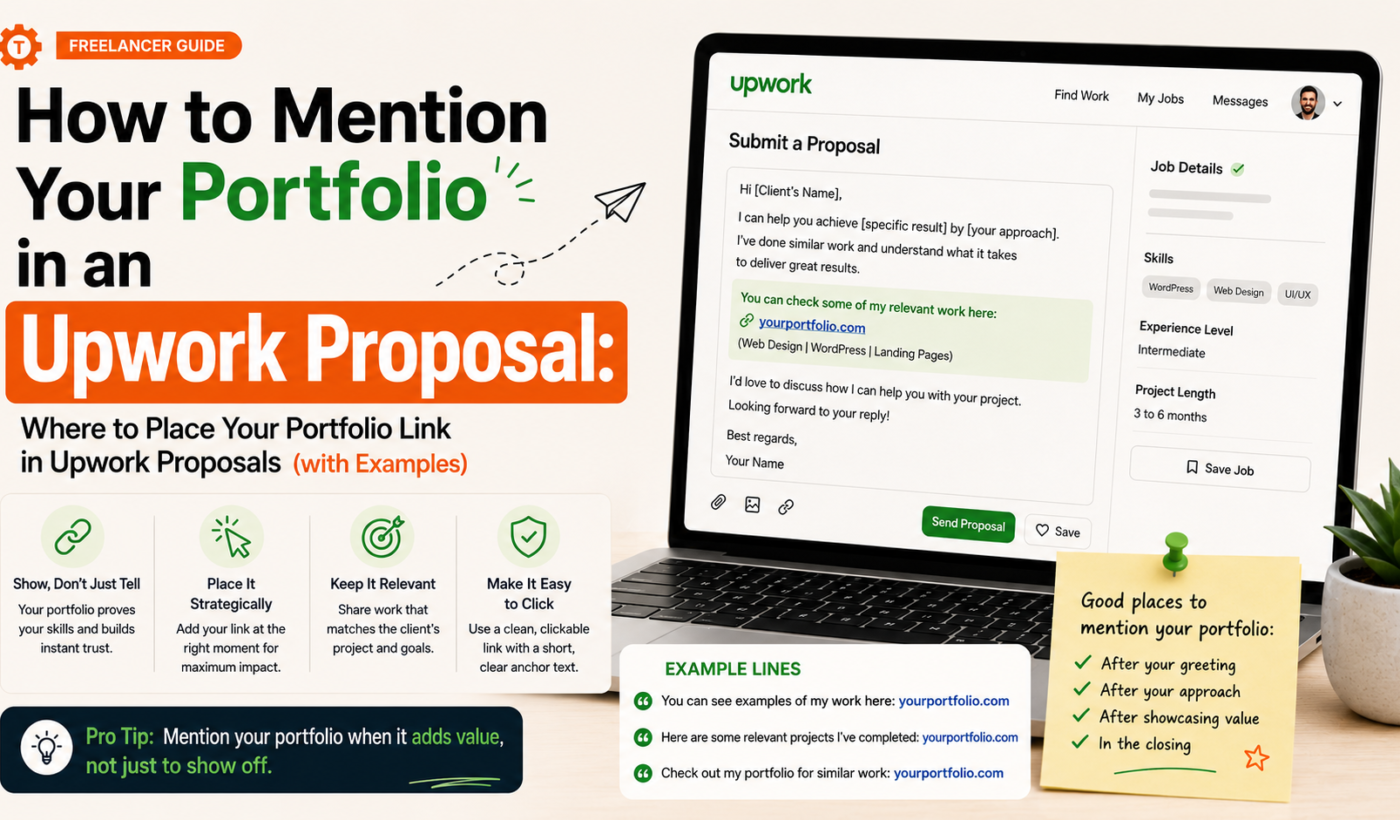
Mentioning your portfolio link in an Upwork proposal can make the difference between a quick skim and a client who actually reviews your work. Use the portfolio link in Upwork proposal strategically: place it where it’s relevant, make it trustworthy, and give the client a quick cue about what to look at first. If you want an instant sentence to paste into a proposal, Try the Upwork Proposal Generator to craft the portfolio mention.
Why you should mention your portfolio in an Upwork proposal
When a portfolio link improves your chance to stand out
Linking directly to a strong, relevant portfolio sample helps clients validate your skills fast. For competitive jobs or projects that require specific examples (design, case studies, code, long-form writing), a direct link reduces friction: the client doesn’t need to search your profile or ask for samples.
When to skip the link and rely on profile samples or attachments
Skip the external link if the client explicitly asks for proposals to include only the Upwork profile, or if you already attached the exact file requested. Also avoid external links for very small, low-risk tasks where the decision is based on budget or availability rather than samples.
Common client expectations around portfolio access
Clients expect quick access to the most relevant examples and a short note telling them what to look at first. They don’t want a long list of everything you’ve done. Highlight 1–3 items and point them directly to those samples.
Where to place your portfolio link in an Upwork proposal
First two lines (attention-grabbing placement) — example phrasing
Putting a concise portfolio mention in the first two lines can grab attention if your samples are your strongest selling point. Use it only when the sample is directly relevant to the job. For guidance on first-line structure, see Upwork proposal first two lines: what to write (with examples).
Example opener for a designer: “I’ve redesigned marketplaces like yours — portfolio: Generate a free personalized Upwork proposal (see ‘Marketplace Redesign’ case study).”
Pros: Immediate proof. Cons: Can feel presumptive if the sample isn’t squarely on target.
You can Refine your proposal openings with the Upwork Proposal Generator to test variations of an opener that includes a link.
Middle of the proposal (contextual reference to relevant work) — example phrasing
Reference a project in the body where you describe your approach. This reads naturally: you explain the result and then show proof.
Developer example: “For a similar feature I built an API-backed import tool; see the live demo and code sample here: Use the Upwork Proposal Generator to create focused examples — look at ‘CSV Importer’ under Projects.”
Pros: Shows relevance and gives context before asking the client to click. Cons: Slightly lower visibility than the top-of-proposal placement.
For full proposal structure guidance, read How to Write an Upwork Proposal That Wins Jobs (With Examples).
At the end of the proposal (call-to-action placement) — example phrasing
Ending with a portfolio link works as a final nudge after you’ve explained how you’ll solve the client’s problem.
Writer example: “If you’d like to see more writing like this, here’s a short portfolio: Create send-ready portfolio sentences with the Upwork Proposal Generator — start with ‘Case Study: Landing Page Copy.’”
Pros: Less distracting early on. Cons: Client may not reach the end if they’re skimming.
When to attach files instead of linking
Attach files when the client requested specific deliverables (a design brief, a spec, or a writing sample of a certain length). Attachments keep everything inside Upwork and reduce concerns about external access or privacy.
How to format the portfolio link and surrounding text
Best practices for link text (descriptive anchor vs. raw URL)
- Use short descriptive anchor text: name the sample and the expected takeaway (e.g., “Redesign: SaaS dashboard — 30% engagement lift”).
- Prefer descriptive text over raw long URLs. Upwork preserves clickable links but clean anchor text reads better.
How to avoid link shorteners and look spammy
Do not use URL shorteners. They look unprofessional and create friction. Use a tidy page on your portfolio that clearly labels the sample the client should view.
Combining a single link with 1–2 highlighted sample titles
Offer one link to a curated page and list 1–2 highlighted samples next to it. Example: “Portfolio (see: ‘Checkout UX’ and ‘Mobile Flow’).” This directs attention and reduces the chance a client gets lost.
If you want to test anchor text and sentence variations quickly, Use Typing Engine’s Upwork Proposal Generator to test wording variations.
Examples: portfolio link in Upwork proposal (sample placement and wording)
Designer example (visual portfolio link in the first two lines)
“I specialize in marketplace UX — portfolio: Use the Upwork Proposal Generator to create focused examples (see ‘Marketplace Redesign’ and ‘Mobile Browse’). I’d start by mapping user flows and simplifying checkout.”
Developer example (project-specific sample in the middle)
“I’ll build an import tool that validates rows server-side. For a similar project, see ‘CSV Importer’ in my portfolio: Create send-ready portfolio sentences with the Upwork Proposal Generator. I can produce an initial MVP in two weeks.”
Writer example (end-of-proposal call-to-action with portfolio link)
“I’ll draft three headline options and two rounds of edits. For samples of conversion-focused pages, see: Create send-ready portfolio sentences with the Upwork Proposal Generator — start with ‘Product Launch Copy.’”
Short templates you can reuse
- First lines: “Relevant sample: [Project Title] — [short result]. Portfolio: Generate a free personalized Upwork proposal.”
- Middle: “I solved this by [approach]. See the example: Create send-ready portfolio sentences with the Upwork Proposal Generator (‘Project Title’).”
- End: “If helpful, review my selected samples: Use the Upwork Proposal Generator to create focused examples — recommended: ‘Project A,’ ‘Project B.’”
Want quick personalized examples? Use the Upwork Proposal Generator to create focused examples for your role and paste the lines straight into proposals.
Checklist: what to include before you paste your portfolio link
- Confirm sample relevance: Pick 1–3 items that directly match the job requirements.
- Test the link: Open it in an incognito window to confirm it loads and shows the intended sample.
- Ensure public access: Avoid broken or gated links unless you explain how to request access.
- Add short context: Tell the client what to look at first (e.g., “See the checkout flow and the A/B results”).
To put the final proposal together and include the tested link, Generate a portfolio-focused proposal quickly.
Dos and don’ts when linking to your portfolio on Upwork
Dos: be specific, concise, and transparent
- Do name the project and the result.
- Do highlight which part of the sample is most relevant.
- Do test the link and prefer a single curated page for clarity.
Don’ts: don’t overwhelm, don’t hide behind link shorteners, don’t overshare irrelevant work
- Don’t drop a long list of links with no context.
- Don’t use URL shorteners or vague labels like “My work” without detail.
- Don’t include sensitive or NDA-protected work without permission.
How to handle NDA or private work samples
If the best samples are private, offer redacted versions, short case study summaries, or a private view option. Say: “I can share a redacted case study or private link on request.” That reassures the client while respecting confidentiality.
Using Typing Engine tools to speed up portfolio mentions
Generate a tailored portfolio mention with the Upwork Proposal Generator
The fastest way to test different placements and wording is to generate variations using Typing Engine. Generate a free personalized Upwork proposal and pick the portfolio sentence that fits your tone and the job.
For tips on creating full proposals quickly, read How To Generate Winning Upwork Proposals in Minutes (Not Hours).
Polish your LinkedIn headline or profile that clients may check after seeing your link
Clients often cross-check LinkedIn. If you want a concise LinkedIn headline or bio to match your portfolio, Improve your LinkedIn headline and bio before you send the link.
Final checklist and quick send-ready templates
3 send-ready one-line portfolio mentions for different job types
- Designer (first lines): “Portfolio: ‘Marketplace Redesign’ (mobile + desktop) — Use the Upwork Proposal Generator to create focused examples.”
- Developer (middle): “See ‘CSV Importer’ for the data flow and tests: Create send-ready portfolio sentences with the Upwork Proposal Generator.”
- Writer (end): “Selected samples: ‘Landing Page Copy,’ ‘Email Series’ — Create send-ready portfolio sentences with the Upwork Proposal Generator.”
Pre-send checklist (quick reminder)
- Confirm relevance and highlight 1–3 items.
- Test the link in incognito.
- Ensure public access and clear labels.
- Include a 1-line context telling the client what to review first.
FAQ
Should I paste my full portfolio URL or use a short anchor text in an Upwork proposal?
Use short descriptive anchor text that names the sample and outcome rather than a long raw URL. That reads better and sets expectations for the client.
Is it better to link to my Upwork profile or an external portfolio in the proposal?
Link to your Upwork profile when the client asked specifically to review profile samples or when your profile already contains the exact examples. Use an external or curated portfolio link when you want to highlight specific projects not visible on your Upwork profile.
Can I include multiple portfolio links in one proposal?
Limit links. Prefer one curated link with 1–3 highlighted samples listed next to it. Multiple links increase friction and look unfocused.
What do I write next to the link so clients know which samples to review?
Write a one-line cue: project title and what the client should look for (e.g., “see the checkout flow and conversion test”).
How do I share private or NDA-protected work when a client asks for samples?
Offer redacted screenshots, summarized case studies, or a private link upon request. Explain that the full sample is available under NDA.
Ready to save time? Try Typing Engine’s free Upwork Proposal Generator to create tailored portfolio mentions and full proposal variations you can paste into applications: Generate a free personalized Upwork proposal.