
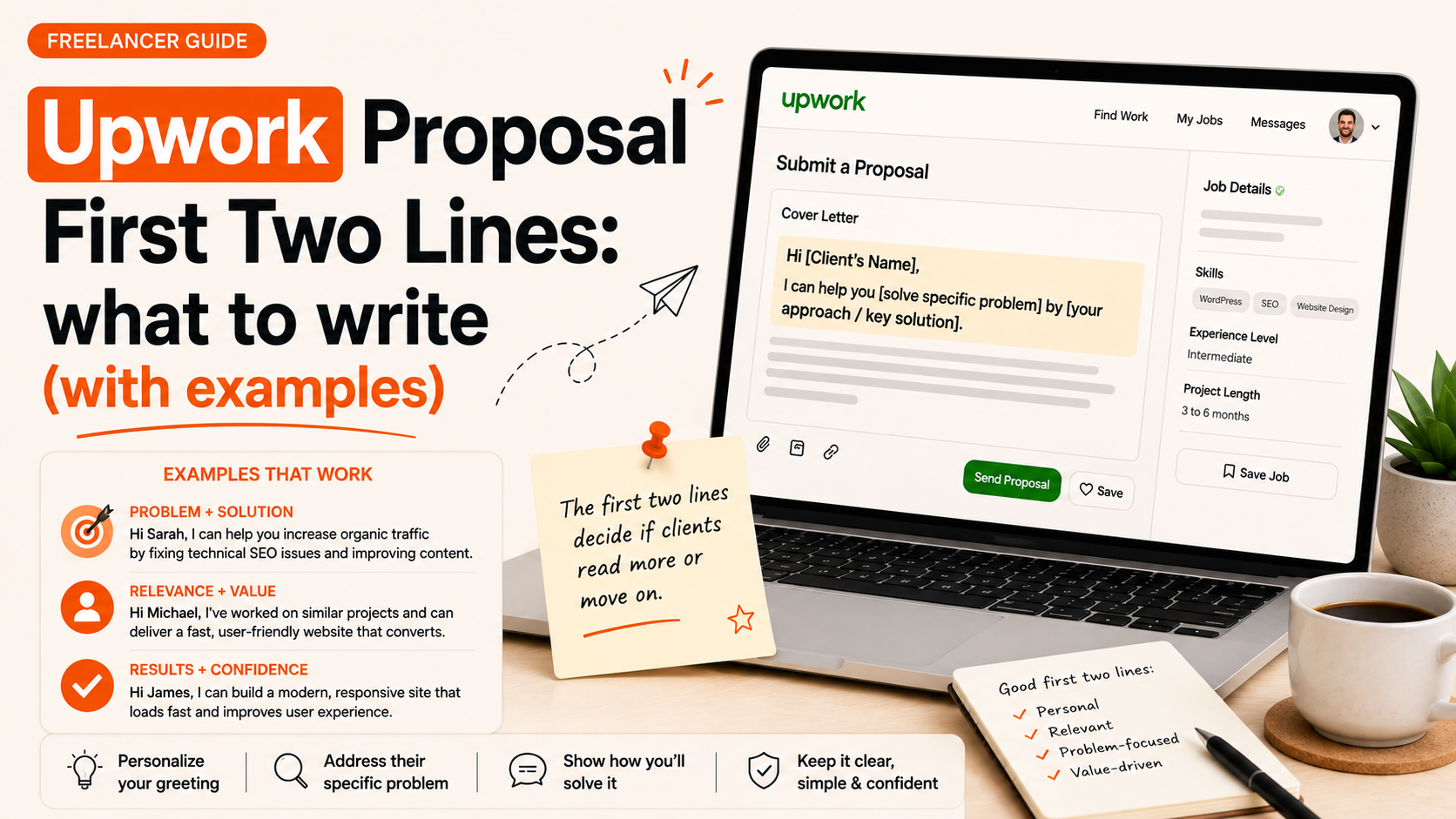
Upwork proposal first two lines: why they decide if a client keeps reading
The Upwork proposal first two lines are the single most important part of your pitch. Clients scan listings fast and decide within seconds whether a freelancer is worth reading. If those lines don’t hook, prove relevance, and signal trust, the rest of your proposal may never be read.
If you want to skip straight to a tool that generates tailored openings, Use Typing Engine’s Upwork Proposal Generator to create personalized first-two-line options you can copy and test.
Why the first two lines matter
How clients scan proposals on Upwork
Clients typically skim the top of a proposal, look for job-specific language, and note anything that directly answers their brief. Most hiring clients open several proposals and decide quickly; that means your opening must stop the swipe and promise a clear benefit.
The three jobs those two lines must do: hook, proof, relevance
- Hook: Grab attention with a short, relevant lead (question, bold claim, or client-focused statement).
- One-line proof: A quick credibility signal—years of experience, a short metric, or a concise result.
- Relevance statement: Mirror the client’s language to show you understand the brief and can solve their problem.
What an effective opening looks like (framework)
Formula: Hook + one-line proof + relevance statement
Use a compact formula you can repeat: Hook + one-line proof + relevance. Keep it tight: two short lines (roughly 15–30 words total).
Example structure: “Do you need X? I built Y that did Z. I can start by doing A to solve your X.” That fits conversationally into two lines and does the three jobs above.
When to open with a question vs. a statement vs. a metric
- Question: Use when the job has a clear pain point (good for conversion copy, VA tasks, project fixes).
- Statement: Use when you can make a short, direct promise about your approach or availability.
- Metric: Use when you have a concise result (e.g., “20% CTR increase”) that proves value quickly—best for marketing and analytics roles.
For help matching this framework to an actual job post, see Upwork cover letter vs. proposal — know the difference so you place your opening in the right spot.
Quick examples: 12 first-two-line openings you can adapt
Below are copy-ready openings for common roles. Personalize one detail and use it as your first two lines.
Designer example (UI/UX)
“Want a cleaner checkout that reduces drop-off? I redesigned a SaaS checkout and cut cart abandonment by 18% in two weeks. I can audit your flow and propose 3 quick changes.”
Developer example (frontend / WordPress)
“Fast WordPress fix—available today. I’ve maintained 50+ WP sites (speed, security, plugin conflicts). I’ll reproduce the bug, patch it, and send a short report.”
Writer example (blog/article)
“Need a research-backed article that ranks for [keyword]? I write 1,200–1,800 word posts with sources and SEO headings. I can deliver a draft in 3 days aligned to your brief.”
Marketing example (PPC / social ads)
“Lower CPA in 30 days: I run ad tests for B2C apps and cut CPAs by up to 25% through creative and audience splits. I’ll set up 3 test campaigns and report weekly.”
Virtual assistant example
“Ready to handle scheduling, emails, and research—so you focus on growth. I support founders with inbox triage and calendar management; I can start with a 2-hour onboarding session.”
Short-form hooks for hourly and fixed-price jobs
- Hourly: “Available 10–20 hrs/week; experienced with X tool and daily check-ins.”
- Fixed-price: “Deliver the full project in 7 days with QA and one revision included.”
New to Upwork? See How to Get Your First Job on Upwork (Beginner’s Guide) for openings tailored to entry-level posts.
For more full-proposal guidance beyond the opening lines, check How to Write an Upwork Proposal That Wins Jobs (With Examples).
Template variations by job type and client intent
Short-term / quick-turnaround projects
KISS: question + availability. Example: “Need this in 48 hours? I can deliver the full task in 2 days and share progress twice daily.”
Long-term / retainer-style projects
Signal commitment: proof + plan. Example: “Experienced with monthly retainers for X. I manage tasks, report weekly, and handle onboarding—can start 10 hrs/week next Monday.”
High-budget, high-expertise projects
Lead with a short credibility cue and a case highlight: “I led a 6-person team building X; delivered Y. I’ll map your requirements and propose milestones in 48 hours.”
How to personalize openings in 60 seconds
What to scan in the job post
- Primary deliverable and deadline.
- Tools or platforms named (e.g., WordPress, Figma, Google Ads).
- Any pain words: “slow,” “broken,” “not converting,” etc.
Words and phrases to mirror
Take the client’s exact wording and drop one or two phrases into your first two lines. That tells a client you read the brief and speak their language.
Using small, specific details to signal relevance
Reference a sentence from the job post or a required tool. Small specifics (like “Shopify theme X” or “Figma file and Sketch export”) are strong relevance signals.
Want to speed this process? Use Upwork Proposal Generator (quick personalization) to create openings that mirror the job language and save templates. For a workflow that produces entire proposals fast, see How To Generate Winning Upwork Proposals in Minutes (Not Hours).
Formatting, length and tone: practical rules
Recommended length for two lines (words/characters)
Two lines should be short: aim for 15–30 words total, or about 90–160 characters. The goal is scannability, not detail.
Tone: professional, direct, encouraging
Be confident but not arrogant. Use client-focused language: “you” and “your” instead of long paragraphs about yourself.
When not to use emojis or flashy formatting
Skip emojis for technical, B2B, or high-budget projects. Use minimal punctuation and avoid ALL CAPS. Bullets are fine after the first two lines, but keep the opening clean.
Common mistakes and how to fix them
- Generic openings: “Hi, I can help” → Replace with a question or a one-line proof tied to the brief.
- Over-sharing: Long backstory in the first two lines → Move details to the paragraph below; keep the opening focused.
- Wrong focus: Talking about yourself instead of the client → Always lead with the client problem or result.
Quick checklist & plug-and-play templates
Two-line checklist (5 items)
- Hook: ask or state the immediate benefit.
- One-line proof: short metric, years, or relevant count.
- Relevance: mirror a key phrase or tool from the job post.
- Length: keep both lines under ~30 words total.
- Call to next step: hint at what you’ll do first (audit, quick fix, draft).
If you want ready openings generated and saved as templates, Generate a free personalized Upwork proposal to test several variations quickly.
Six ready-to-use templates (short, medium, long)
- Short: “Need this fixed today? I’m available and can deliver a patch within 4 hours.”
- Short: “I’ve built [tool] integrations like yours—available to start now.”
- Medium: “I reduced X by Y% for a similar client. I’ll audit and propose 3 fixes in 48 hours.”
- Medium: “I write SEO articles that rank for niche keywords; I’ll send a 1,200-word draft in 3 days.”
- Long: “I manage monthly marketing retainers and report weekly; I can start at 10 hrs/week next Monday.”
- Long: “I lead technical migrations and deliver milestone plans—happy to scope and send a timeline within 48 hours.”
Pair these templates with full-proposal structures from How to Write an Upwork Proposal That Wins Jobs (With Templates).
How to test and improve your openings
What to track (responses, interview invites, replies)
Track simple metrics: response rate (replies), interview invites, and messages that turn into jobs. Small changes can move these metrics if the opening improves relevance.
Small experiments you can run in your next 10 proposals
- Send 5 proposals with a question-based opening and 5 with a proof-based opening; compare replies.
- Swap one mirrored phrase from the job post in half your proposals to test personalization impact.
- Record reply rate for each variation and keep the best-performing opening as a template.
To manage variations and speed iterations, Typing Engine’s Upwork Proposal Generator (save templates) can help you generate and track different opening lines.
Where to get faster openings (tools and next steps)
Use an AI-powered generator to speed personalization and create multiple honest variations that match the job language. For immediate help, Generate a free personalized Upwork proposal.
Also consider aligning your profile messaging with your proposal openings; see How to write an Upwork profile summary that attracts clients and try to keep tone consistent across both. If you want consistent LinkedIn messaging too, Improve your LinkedIn headline and bio.
Conclusion and action plan
Quick 3-step action plan: 1) Pick one template above and personalize it for a live job this week. 2) Track replies for 10 proposals using two opening styles. 3) Keep the best opener as a template and iterate.
Ready to speed this up? Try Typing Engine’s free Upwork Proposal Generator to generate tailored first-two-line openings you can test immediately.
FAQ
How long should the first two lines of an Upwork proposal be?
Aim for 15–30 words total (about 90–160 characters). The goal is scannability: short, client-focused, and relevant.
Should I address the client by name in the first two lines?
Use the client’s name if it’s available and you can insert it naturally. Otherwise, lead with the client problem or a benefit—personalization is more effective when it mirrors the brief.
Is it better to open with a question or a quick proof statement?
Both work. Use a question for clear pain points and a quick proof statement when you have a concise, verifiable result. Test both to see which gets more replies in your niche.
How much personalization is enough for the first two lines?
One clear, job-specific detail (tool, deadline, metric, or phrase from the brief) is usually enough to prove relevance. Personalize more in the paragraph below if needed.
Can I use the same opening for multiple similar job posts?
Yes—if you adapt one detail from the job post (tool name, deadline, or specific deliverable). Reusing an opening without any job-specific tweak will feel generic.
Where can I find more examples and full proposal templates?
See How to Write an Upwork Proposal That Wins Jobs (With Examples) for longer sample proposals and How to Write an Upwork Proposal That Wins Jobs (With Templates) for plug-and-play templates.
Action step: pick one template above, personalize it for a live job today, and test two variations across your next 10 proposals.
Primary CTA: Try Typing Engine’s free Upwork Proposal Generator to generate, save, and test personalized openings fast: Generate a free personalized Upwork proposal.